We have compiled a list of manufacturers, distributors, product information, reference prices, and rankings for Material Takeoff Calculation Software.
ipros is IPROS GMS ・ IPROS One of the largest technical database sites in Japan that collects information on.

Material Takeoff Calculation Software - List of Manufacturers, Suppliers, Companies and Products | IPROS GMS

Material Takeoff Calculation Software Product List

1~7 item / All 7 items

Displayed results

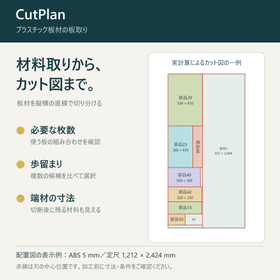
Optimize the cutting plan for plastic sheets | CutPlan

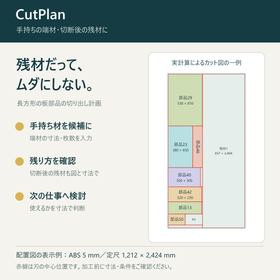
Summarize and confirm the required number of resin boards, utilization of leftover materials, and cutting diagrams. We will assist in decision-making for estimates and material procurement.

We support the cutting of plastic sheets, such as acrylic and ABS boards, into rectangular shapes on-site. CutPlan is a material calculation tool for cutting rectangular parts from sheets. You can input the width, height, and quantity of the parts, as well as the available standard sizes and scraps, to compare the required number of pieces, yield, and material combinations. The selected plan can be printed in black and white as a cut diagram or saved as a PDF. You can paste three columns of width, height, and quantity from Excel all at once. By entering the unit price of the materials, you can also check the material costs.

  • Other CAM related software
  • Material Takeoff Calculation Software

Added to bookmarks

Bookmarks list

Bookmark has been removed

Bookmarks list

You can't add any more bookmarks

By registering as a member, you can increase the number of bookmarks you can save and organize them with labels.

Free membership registration

Even leftover materials won't go to waste. | CutPlan

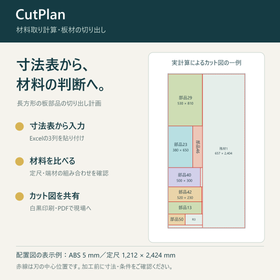
Taking into account the leftover materials on hand, confirm the remaining materials after cutting with diagrams and dimensions. You can consider their use for the next job based on the dimensions.

Even leftover materials should not be wasted. CutPlan is a Windows software that assists in board layout, including the use of available scraps and checking the materials left after cutting. You can input the width, height, and quantity of parts, as well as the dimensions and number of usable scraps you have. It allows you to compare the required number of sheets, including purchased standard lengths, yield, and combinations of materials. When the amount of material used is the same, it also considers how the leftover materials will be arranged to compare options. In the selected plan, you can check the shape and dimensions of the leftover materials in the cutting diagram, allowing users to determine if they can be used for the next job. The cutting diagram can be printed in black and white or saved as a PDF.

  • Other CAM related software
  • Material Takeoff Calculation Software

Added to bookmarks

Bookmarks list

Bookmark has been removed

Bookmarks list

You can't add any more bookmarks

By registering as a member, you can increase the number of bookmarks you can save and organize them with labels.

Free membership registration

Optimize material procurement! Calculation tool for yield comparison support.

Try it free for 15 days! No credit card registration required and no automatic billing. You can easily experience the optimization of material procurement.

We offer a Windows tool that supports material selection, utilization of leftover materials, and confirmation of cutting diagrams for sheet materials. If you overestimate the materials, the quotation will be high, leading to lost orders. If you underestimate, there may not be enough materials after the order is placed, cutting into profits. With this tool, you can visualize the necessary number of materials, combinations of standard sizes, whether leftovers can be used, and even the cutting diagrams to be handed over to the site. This is not a high-functionality large nesting software, but a practical tool that makes daily material selection easier. 【Features】 ■ Move away from square meter calculations and rough estimates ■ Visualize standard sizes, leftovers, and cutting diagrams ■ Reduce over-purchasing and forgetting to buy materials ■ Designed for practical use based on manual input and Excel import *For more details, please feel free to contact us.

  • Other CAM related software
  • Material Takeoff Calculation Software

Added to bookmarks

Bookmarks list

Bookmark has been removed

Bookmarks list

You can't add any more bookmarks

By registering as a member, you can increase the number of bookmarks you can save and organize them with labels.

Free membership registration

Optimize board cutting for signboard materials | CutPlan

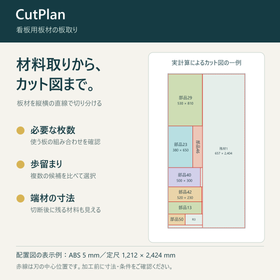
Check the number of boards needed and how to cut them based on the dimensions and quantity of the signboard panels. You can also compare including waste materials.

We assist in the layout for cutting acrylic sheets and aluminum composite panels for signboards into rectangular panels. CutPlan is a material calculation tool for cutting rectangular parts from sheet materials. You can input the width, height, and quantity of the parts, as well as the available standard sizes and leftover materials, to compare the required number of pieces, yield, and combinations of materials. The selected plan can be printed in black and white as a cutting diagram or saved as a PDF. You can paste three columns of width, height, and quantity from Excel all at once. By entering the unit price of the materials, you can also check the material costs.

  • Other CAM related software
  • Material Takeoff Calculation Software

Added to bookmarks

Bookmarks list

Bookmark has been removed

Bookmarks list

You can't add any more bookmarks

By registering as a member, you can increase the number of bookmarks you can save and organize them with labels.

Free membership registration

Create material take-off drawings and output to PDF | CutPlan

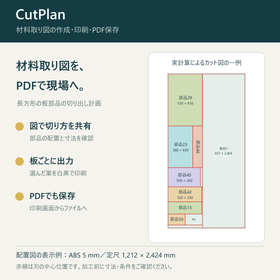
Share how to cut the board using the material layout drawing. Confirm the arrangement and dimensions of the parts, and proceed to black-and-white printing and PDF saving.

For those who want to create a material cutting diagram and share the cutting details with the processing personnel. CutPlan is a Windows software that creates cutting diagrams for rectangular sheet parts based on their dimensions and quantities. By specifying usable standard lengths, leftover materials, blade width, outer margins, and processing allowances, it calculates and allows you to choose the plan to adopt. The diagram shows the arrangement of parts, cutting lines, and the shape and dimensions of the leftover materials after cutting. You can print the selected plan in black and white as a material cutting diagram, sheet layout diagram, or cutting layout diagram. By saving it as a PDF from the print screen, both the material procurement personnel and the processing personnel can view the same diagram.

  • Other CAM related software
  • Material Takeoff Calculation Software

Added to bookmarks

Bookmarks list

Bookmark has been removed

Bookmarks list

You can't add any more bookmarks

By registering as a member, you can increase the number of bookmarks you can save and organize them with labels.

Free membership registration

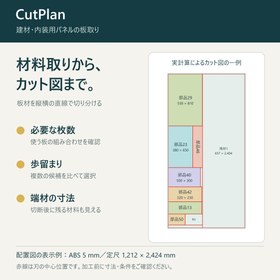
Optimize board cutting for building materials and interior panels | CutPlan

How many sheets of board material to arrange for the interior, and how to cut them out. You can check the required number and layout from the panel dimensions.

We assist in optimizing the cutting of plywood and decorative boards for interior use into rectangular panels and components. CutPlan is a material calculation tool for cutting rectangular parts from sheets. You can input the width, height, and quantity of the parts, as well as the available standard sizes and leftover materials, to compare the required number of pieces, yield, and combinations of materials. The selected plan can be printed in black and white as a cutting diagram or saved as a PDF. You can paste three columns of width, height, and quantity from Excel all at once. By entering the unit price of the materials, you can also check the material costs.

  • Other CAM related software
  • Material Takeoff Calculation Software

Added to bookmarks

Bookmarks list

Bookmark has been removed

Bookmarks list

You can't add any more bookmarks

By registering as a member, you can increase the number of bookmarks you can save and organize them with labels.

Free membership registration

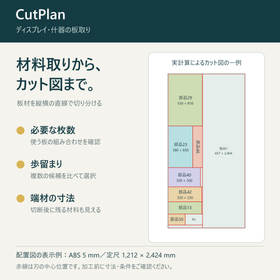
Optimize board cutting for display and fixture materials | CutPlan

Calculate the panel and fixture board components together. You can compare the arrangement of differently sized components using diagrams and numbers.

We support the layout for cutting rectangular panel parts such as display panels, storefront displays, and shelves and dividers for fixtures. CutPlan is a material calculation tool for cutting rectangular parts from sheet materials. You can input the width, height, and quantity of the parts, as well as the available standard sizes and leftover materials, to compare the required number of pieces, yield, and combinations of materials. The selected plan can be printed in black and white as a cutting diagram or saved as a PDF. You can paste three columns of width, height, and quantity from Excel all at once. By entering the unit price of the materials, you can also check the material costs.

  • Other CAM related software
  • Material Takeoff Calculation Software

Added to bookmarks

Bookmarks list

Bookmark has been removed

Bookmarks list

You can't add any more bookmarks

By registering as a member, you can increase the number of bookmarks you can save and organize them with labels.

Free membership registration